The ClientRelay MCP integration helps an AI assistant retrieve information and perform supported tasks involving clients, contacts, groups, proposals, forms, templates, invoices and organisation settings.
Its main benefit is helping users work more efficiently by reducing manual searching and preparing supported records through an AI-assisted workflow.
However, MCP is not a replacement for the full ClientRelay application. Certain actions, particularly sending proposals and forms, processing invoices, performing identity checks and managing workflows, remain outside its available capabilities.
Always review the information and drafts prepared through the integration before taking action in ClientRelay.
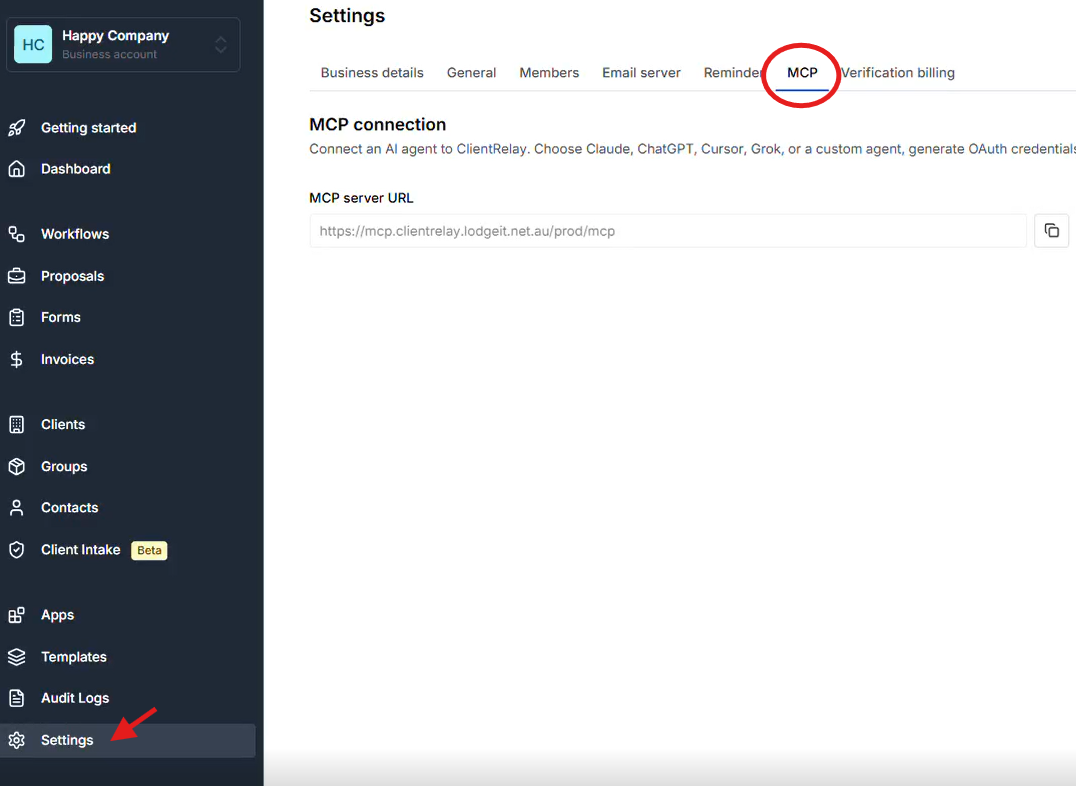
TABLE OF CONTENTS
- 1. What is MCP in ClientRelay?
- 2. Capability: What can the MCP integration do?
- A. Organisation & Settings
- B. Client and Contact Management
- C. Client Groups
- D. Proposals and Engagements
- E. Forms and Questionnaires
- F. Invoices
- G. Templates Catalogue and Starter Pack
- H. Placeholder
- Available placeholders
- Where can placeholders be used?
- Example: Using placeholders in an engagement letter
- Important: Use the exact placeholder code
- I. Organisation Settings
- 3. Capability gaps: What can MCP NOT do?
- 4. How does a typical workflow work?
- 5. Important things to remember
- 6. Frequently Asked Questions
1. What is MCP in ClientRelay?
MCP (Model Context Protocol) is a standard that allows AI assistants or other connected tools to communicate with ClientRelay and interact with supported platform features.
Think of MCP as a bridge between an AI assistant and ClientRelay. It allows the assistant to retrieve information, check records, and perform certain tasks without manually navigating through every screen in ClientRelay.
For example, an AI assistant may be able to find a client, check their existing proposals, prepare a new proposal draft, or review invoice information.
However, the MCP integration does not have access to every ClientRelay feature. Its capabilities depend on the tools made available through the connection.
2. Capability: What can the MCP integration do?
The available tools are grouped into several areas.
A. Organisation & Settings
The integration can:
- Set Active Organisation. Validate access or resolve an organisation name to an ID.
- Get Organisation. ie, Org profile: legal/trading name, entity type, address, ABN/ACN/TFN, industry code, currency, members (staff) - useful for signatories.
- Get Organization Settings. ie, GST, invoice terms, interest, proposal reminders, notification toggles, Stripe fee pass-through, mail sender (no OAuth secrets returned).
- Update Organization Settings. ie Partial update — only fields sent are changed. Learn more
B. Client and Contact Management
The integration can:
Search for existing clients and view their details.
Create new client records.
Update client information, such as legal name, business details and addresses.
View contacts linked to a client.
Update contact details, including email address, phone number and role.
Identify primary contacts, billing contacts and authorised signatories.
Example: You can ask an AI assistant to find a client and check the contact details currently recorded in ClientRelay.
Important: There is no standalone tool for creating an additional contact. A new contact can only be created as a primary contact through supported proposal or form creation processes, with explicit user approval.
C. Client Groups
The integration can:
Search and view existing client groups.
Create a new client group.
Rename an existing group.
Add clients to a group.
Remove clients from a group.
View group members and counts of associated proposals, forms and workflows.
Example: You can ask the assistant to find a particular client group and review its members.
Limitation: Client groups cannot be deleted through MCP.
D. Proposals and Engagements
The integration can:
Search and view existing proposals.
Create a basic proposal draft.
Update an existing proposal draft.
Duplicate a proposal for annual renewals or similar work.
Configure proposal services, fees, payment options, engagement content and email content where supported.
Review proposal details before the proposal is sent.
Example: When preparing a client's annual engagement, the assistant can duplicate an existing proposal and help update the fees or services.
Important: Creating or updating a proposal does not send it to the client. The user must review and send it manually through the ClientRelay application.
E. Forms and Questionnaires
The integration can:
Search and view existing forms.
Create a form draft using an existing form template.
Update supported draft details, including the title, client, contact and email subject or message.
Duplicate a form into a new draft.
Create and update form templates.
Review submitted answers from forms that are in progress or completed.
Example: You can prepare a tax information questionnaire for a client using an existing template.
Important: A form created from a template copies that template's structure at the time of creation. Changes made to the original template later will not automatically update existing form drafts.
Also, updating a form draft does not send it to the client. The user must send it through the ClientRelay application.
F. Invoices
The integration can:
Search invoices by status.
View invoice details, including line items, amounts, payment terms, due dates and payment status.
Review invoices associated with a client or proposal.
Example: You can ask the assistant to find failed invoices or review an invoice's recorded payment status.
Limitation: MCP cannot create, edit, cancel, void or resend invoices. It also cannot record payments or trigger direct debits.
G. Templates Catalogue and Starter Pack
The integration can work with the following template types:
Proposal templates
Engagement templates
Email templates
Service templates
Service scope templates
Form templates
It can also list available starter packs and copy supported shared templates into the organisation.
Example: A new organisation can use the available Accounting and Tax starter pack to copy standard templates into its own template catalogue.
Important: Existing templates with the same titles are skipped when a starter pack is cloned. Shared email, engagement and proposal templates cannot be updated through the available update tools.
H. Placeholder
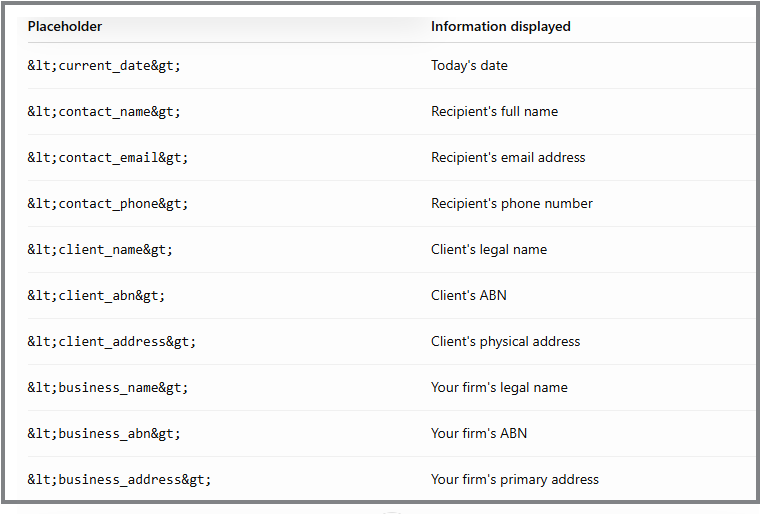
Placeholders are special codes that automatically display the correct information when used in supported content, such as an email, engagement letter or service scope.
Instead of manually typing the client's name, email address or business details every time, you can insert a placeholder. ClientRelay uses the relevant information stored in the system to populate it.
Available placeholders
Where can placeholders be used?
Placeholders are supported in the following content:
Email templates: Automatically insert recipient or client details into email content.
Engagement letters: Populate relevant client and business information in engagement documents.
Service scope templates: Insert client details into the description of the services being provided.
Where placeholders are not supported:
Catalogue service descriptions.
Form question text.
The plain-text email message used when sending a form.
Using a placeholder in an unsupported area will not automatically populate the intended information.
Example: Using placeholders in an engagement letter
Instead of manually entering the client and business details, you can write:
Dear <contact_name>,
We are pleased to provide our services to <client_name>, ABN <client_abn>.
Our firm, <business_name>, will provide the services outlined in this engagement.
Date: <current_date>
When the supported content is populated, the placeholders are intended to be replaced with the relevant information.
Important: Use the exact placeholder code
When working with placeholders through the MCP integration, always use the exact storageToken provided by ClientRelay's placeholder catalogue.
For example, use <client_name> rather than inventing alternatives such as {{client_name}} or [Client Name].
The integration requires the exact supported token. Do not change its spelling or format.
Tip: Before sending an email or engagement document to a client, review the generated content to confirm that the placeholders have been populated correctly.
I. Organisation Settings
The integration can view organisation details and supported settings, including:
Business and organisation information.
GST and invoice settings.
Invoice terms and interest settings.
Proposal reminder settings.
Notification preferences.
Supported email sender settings.
The default AML monitoring setting.
Some of these settings can be updated through MCP.
Important: Changes to organisation settings should be made carefully because they may affect how the platform behaves for the organisation.
3. Capability gaps: What can MCP NOT do?
Although the integration supports many tasks, the following actions are not available through MCP:
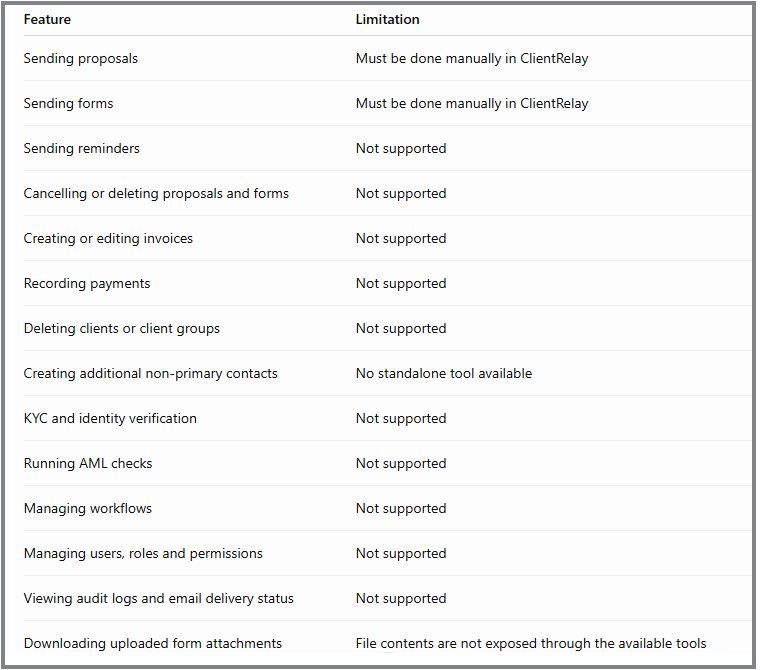
Remember: The integration can help prepare and manage supported records, but it cannot replace every action performed directly in ClientRelay.
4. How does a typical workflow work?
Example 1: Preparing a new client proposal
Find the client and confirm the correct contact.
Check the available proposal, service, engagement and email templates.
Create a basic proposal draft.
Add the required services, pricing, payment details and engagement information.
Review the completed draft for accuracy.
Open ClientRelay and manually send the proposal to the client.
Example 2: Preparing a client questionnaire
Check the available question types and, if needed, form conditions.
Create the form template.
Review the template structure and question order.
Find the client and confirm the appropriate contact.
Create a form draft using the template.
Add or update the email subject and message.
Review the draft in ClientRelay.
Manually send the form to the client.
Example 3: Checking invoice information
Search invoices using the required status.
Identify the relevant client or invoice.
Retrieve the invoice details.
Review the recorded amount, due date and payment status.
If an action is required, such as recording a payment or correcting an invoice, complete it directly in ClientRelay if the feature is available to your user account.
5. Important things to remember
Always confirm the correct organisation. The integration needs the organisation ID for most operations. It does not automatically retain an active organisation between calls.
Check existing records before making changes. Review the relevant client, proposal, form or template before updating it.
Get approval before creating new client records or contacts through a proposal or form workflow. The integration does not automatically create these records when they are missing.
Use the correct template names and placeholders. Some operations require exact template titles or predefined placeholder tokens. Incorrect names or unsupported placeholders may cause the operation to fail or produce unexpected content.
Review drafts before sending. The integration's proposal and form creation tools are draft-only. Sending must be completed manually in the ClientRelay application.
Be careful with template updates and deletions. Updating a form template can replace its entire structure, while template deletion is available for supported template types. Verify the intended template before making changes.
6. Frequently Asked Questions
Q: Can an AI assistant send a proposal directly to a client?
No. The integration can prepare and update a proposal draft, but a user must send it through ClientRelay.
Q: Can MCP automatically create a client if the client does not exist?
Not automatically. The workflow may return a status indicating that a client needs to be created. The user must explicitly approve the supported creation process before proceeding.
Q: Can MCP create a completely new questionnaire?
Yes. It can create a new form template and then create a form draft from that template. The draft must be sent manually.
Q: Can MCP change an invoice or mark it as paid?
No. Invoice access is read-only. Invoice changes and payment recording are not supported through the integration.
Q: Can MCP perform KYC or identity verification?
No. It can display certain existing KYC information, but it cannot perform identity checks or run AML checks.
Q: Does MCP support all ClientRelay features?
No. It supports only the operations exposed through its available tools. Some actions must still be completed directly in ClientRelay.
Related guides:
Was this article helpful?
That’s Great!
Thank you for your feedback
Sorry! We couldn't be helpful
Thank you for your feedback
Feedback sent
We appreciate your effort and will try to fix the article