Overview
If a Proposal Engagement (Proposal) does not automatically "Signed" by agent/user a “Sign Engagement” button will be visible that indicates the Auto Signature of Agent has failed.

When this occurs, the automation will pause and the agent will need to countersign manually.
Why does this happen?
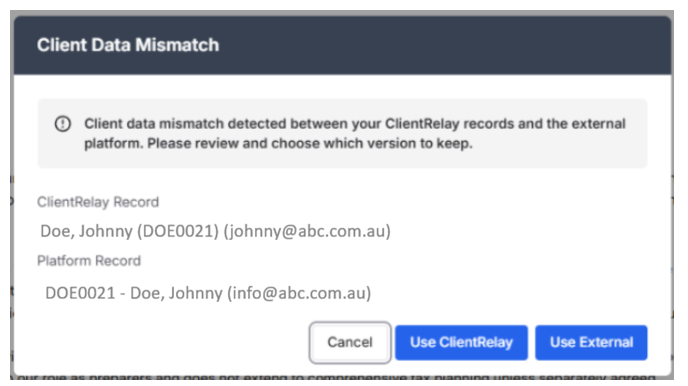
The most common reason is a client data mismatch between the Engagement and the client’s contact details.
For example:
- The email address does not match the email address recorded in the client’s contact details.
- The signatory details are incomplete or incorrect.
What should I do?
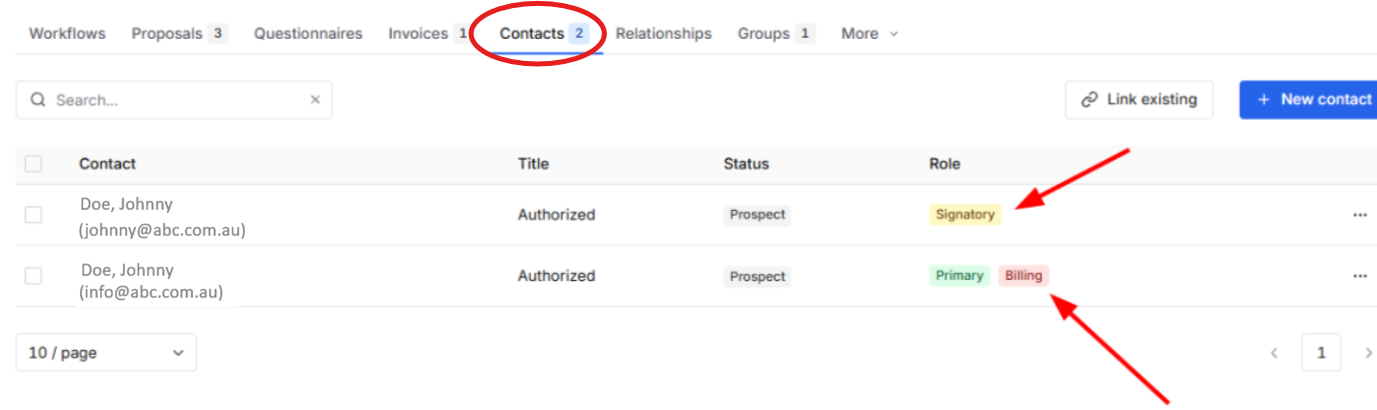
Step 1: Check the client's Contacts
- Open the affected client in ClientRelay.
- Go to the Contacts tab.
- Review the signatory's details.
- Check that the email address and other signatory details are correct and match the details used in the Proposal.
Step 2: Countersign manually
If the details are correct but the auto-signature has already failed:
- Open the Proposal

- Click “Sign Engagement”.
- Complete the agent's signature manually via pressing "Sign Engagement"

Note: Once the auto-signature fails, the automation is paused. Manually countersigning the engagement is required to continue the process.
Was this article helpful?
That’s Great!
Thank you for your feedback
Sorry! We couldn't be helpful
Thank you for your feedback
Feedback sent
We appreciate your effort and will try to fix the article