Occasionally, an invoice may fail to be generated, sent, or paid due to configuration issues, payment processing errors, or missing client information. This guide outlines common causes of failed invoices and the steps you can take to identify and resolve them.
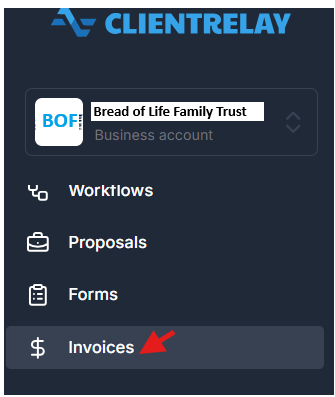
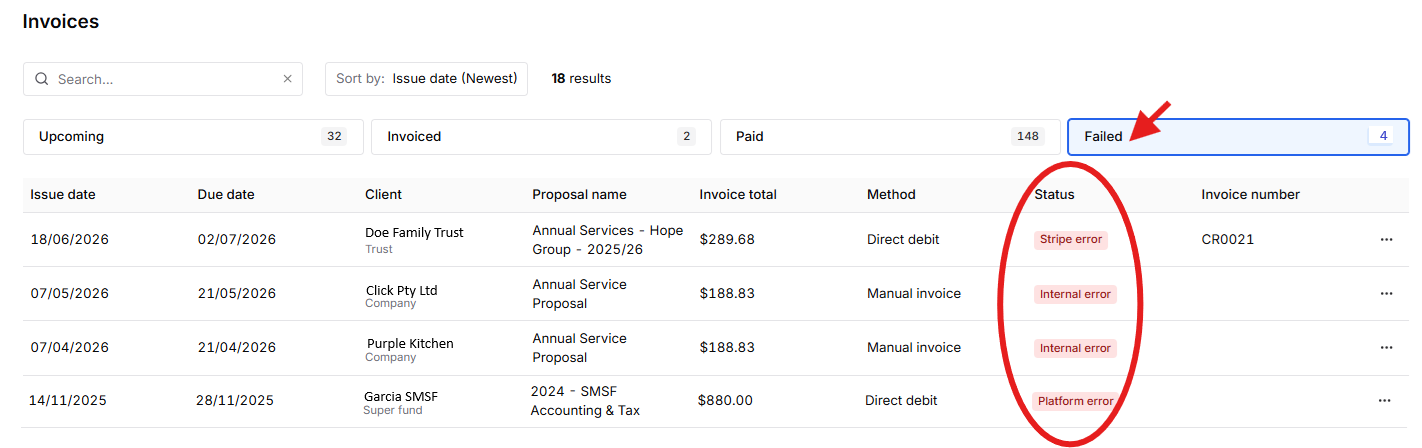
"Stripe Error". An invoice may be generated successfully but fail during payment collection.
- Insufficient client funds
- Payment authorization declined
- Banking or payment processing issues
Resolution:
Contact the client to verify payment details and arrange an alternative payment method if required.
"Internal Error". Invoices may fail if required client details are incomplete.
- Missing client name or contact details
- Invalid email address
- Incomplete billing information
Resolution:
Review the client's profile and update any missing or incorrect information before retrying the invoice.
"Platform Error".
Need Further Assistance?
If the invoice continues to fail after completing the above checks, gather the following information before contacting support:
- Invoice number
- Client name
- Invoice status
- Error message (if displayed)
- Date and time of the failed attempt
Providing these details will help expedite troubleshooting and resolution.
Was this article helpful?
That’s Great!
Thank you for your feedback
Sorry! We couldn't be helpful
Thank you for your feedback
Feedback sent
We appreciate your effort and will try to fix the article